
Authentication
Learn how to get and use an access token for the Solution Reporting API.
To be authenticated and authorized to invoke the Solution Reporting API, you need to:
- Create an API credential to generate a client ID and client secret.
- Use the client ID and client secret to obtain an access token.
- Configure token caching.
Then, you can use the access token to invoke the RESTful API.
Create an API credential in Vertex Cloud
To create an API credential:
-
Click the Account Settings icon ⚙️ on the contextual bar of any page.

-
Select Security & Credentials.
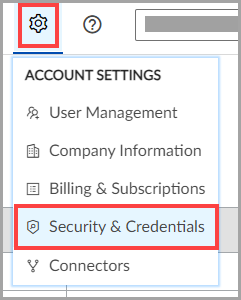
-
Click Create a Credential.
-
(Required): Select API this credential will map to from the dropdown list.
- Select Solution Reporting API.
-
(Optional): Enter a Credential Description.
-
Click Save the Credential. The New Client Credential Created dialog box displays the client ID and client secret.
Caution:The client secret displays only once. You must manually record the client secret when it displays. After you exit the dialog box, you cannot retrieve the client secret. If you lose the client secret, you can create a new one for the client ID.
- Allow 15 minutes for processing before using your client ID and client secret to obtain an access token.
Obtain an access token
Each call to the REST API requires a valid access token. By default, you can submit up to 10 access token requests to the standard access token endpoint every 8 hours. Exceeding the rate limit generates an error.
Note:You can use one access token numerous times within its lifetime until it expires, at which point, you must request a new access token.
To help manage your Vertex RESTful API access tokens and reduce the need for frequent token generation, you can implement local token caching or use the Vertex token caching service.
Local token caching
To obtain your access token, submit an HTTP POST request to the token endpoint: https://auth.vertexcloud.com/oauth/token
Provide the following parameters in the request body:
| Parameter name | Definition | Type |
|---|---|---|
audience | verx://migration-api | String, required |
client_id | The client ID that Vertex provides for the custom integration. | String, required |
client_secret | The client secret that Vertex provides for the custom integration. | String, required |
grant_type | The string client_credentials | String, required |
Success response
If the call is successful (HTTP status code = 200), the JSON object has multiple properties. For example:
{
"access_token": "valid_token_ID",
"token_type": "Bearer",
"expires_in": 1200
}
The access_token and token_type parameters are needed to make calls against the API. The returned expires_in parameter defines the number of seconds until the access token expires. After this time, you must request a new token.
Error response
If an error occurs (HTTP status code != 200), the JSON object has one error property with a message that describes the reason for failure. For example:
{
"error" : "invalid_client"
}
Authorize a request
You must make all API requests against the RESTful API endpoints over HTTPS. When making a request, set the access token in the Authorization header of the request with the token type and access token or access token variable. For example:
Authorization: Bearer Token {ACCESS_TOKEN or ACCESS_TOKEN_VARIABLE}
CautionThis example is for illustration purposes only. It will not work in the API.
Updated 4 months ago