
Token Caching
Learn about caching access tokens.
To help you manage your Vertex RESTful API access tokens and reduce the need for frequent token generation, Vertex provides an access token endpoint that generates and caches your access tokens.
By default, Vertex applies a rate limit of 10 access token requests per 8 hours to our standard access token endpoint. Exceeding this rate limit generates a rate limit error as shown in the following example.
Status: 400 Bad Request
Response body:
{
    "error": "invalid_request",
    "error_description": "Client \<client_id> audience <audience> has exceeded the rate limit of 10 tokens/28800 seconds"
}
To avoid generating rate limit errors, you can implement local token caching or use Vertex's token caching endpoint.
Vertex recommends that you implement token caching within your applications to avoid interrupted access. Note that using Vertex token caching may introduce an additional infrastructure dependency. Because of this dependency, this type of caching may not perform as well as the direct access from token caching that you implement.
Vertex token caching endpoint
Vertex's token caching endpoint, https://tokenguard.vertexcloud.com/cached/oauth/token, generates an access token and lets you retrieve unexpired cached tokens. When you submit a request for an access token, the solution checks for an unexpired cached access token. If an unexpired access token exists, it returns that token. If a cached token has expired, or if no access token exists, the system provides and caches a new token.
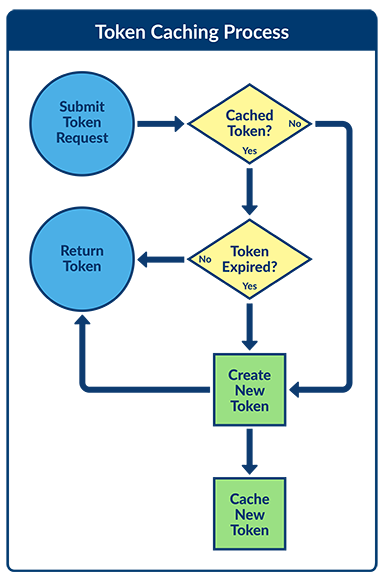
Using the token caching endpoint provides a convenient and efficient way to obtain access tokens. It's especially useful in scenarios where caching tokens in your application is not feasible or when you're dealing with multiple instances or pods.
Token caching integration
Submit a request to the token caching endpoint https://tokenguard.vertexcloud.com/cached/oauth/token by using an HTTP POST.
Include the following parameters:
| Parameter name | Field location | Definition | Type |
|---|---|---|---|
audience | In the request body | The audience for the token, which is your API. The value depends on the API you are going to call. | String, required |
client_id | In the request body or in the Authorization header | The client ID that Vertex provides for the custom integration. | String, required |
client_secret | In the request body or in the Authorization header | The client ID that Vertex provides for the custom integration. | String, required |
grant_type | In the request body | The string client_credentials. | String |
Sample requests with information in request body
The following sample request is to the token caching endpoint, including all required information in the request body and a content type of application/json:
curl --location 'https://tokenguard.vertexcloud.com/cached/oauth/token'
--header 'content-type: application/json'
--data '{
    "client_id": "<your-client-id>",
    "client_secret": "<your-client-secret>",
    "audience": "<audience>",
    "grant_type": "client_credentials"
}'
The following sample request is to the token caching endpoint, including all required information in the request body and with a content type of application/x-www-form-urlencoded:
curl --location '<https://tokenguard.vertexcloud.com/cached/oauth/token'>
--header 'Content-Type: application/x-www-form-urlencoded'
--data-urlencode 'client_id=<your-client-id>'
--data-urlencode 'client_secret=<your-client-secret>'
--data-urlencode 'audience=<audience>'
--data-urlencode 'grant_type=client_credentials'
Sample requests with information in Authorization header
When passing the client_id and client_secret in the request header, you need to set the Authorization header key and value to:
`Bearer {base64(client_id:client_secret)}`The following sample request is passing the client_id and client_secret in the Authorization header with a content type of application/json:
curl --location '<https://tokenguard.vertexcloud.com/cached/oauth/token'>
--header 'content-type: application/json'
--header 'Authorization: Basic base64_encode(<your-client-id>:<your-client-secret>)'
--data '{
    "audience": "<audience>",
    "grant_type": "client_credentials"
}'
The following sample request is passing the client_id and client_secret in the Authorization header with a content type of application/x-www-form-urlencoded:
curl --location '<https://tokenguard.vertexcloud.com/cached/oauth/token'>
--header 'Content-Type: application/x-www-form-urlencoded'
--header 'Authorization: Basic base64_encode(<your-client-id>:<your-client-secret>)'
--data-urlencode 'audience=<audience>'
--data-urlencode 'grant_type=client_credentials'
Updated 4 months ago