
Validations UI
Use this UI to find information about your Tax ID validation activities.
You use the Tax Number Validations UI to search the results of your Tax Validation activities:
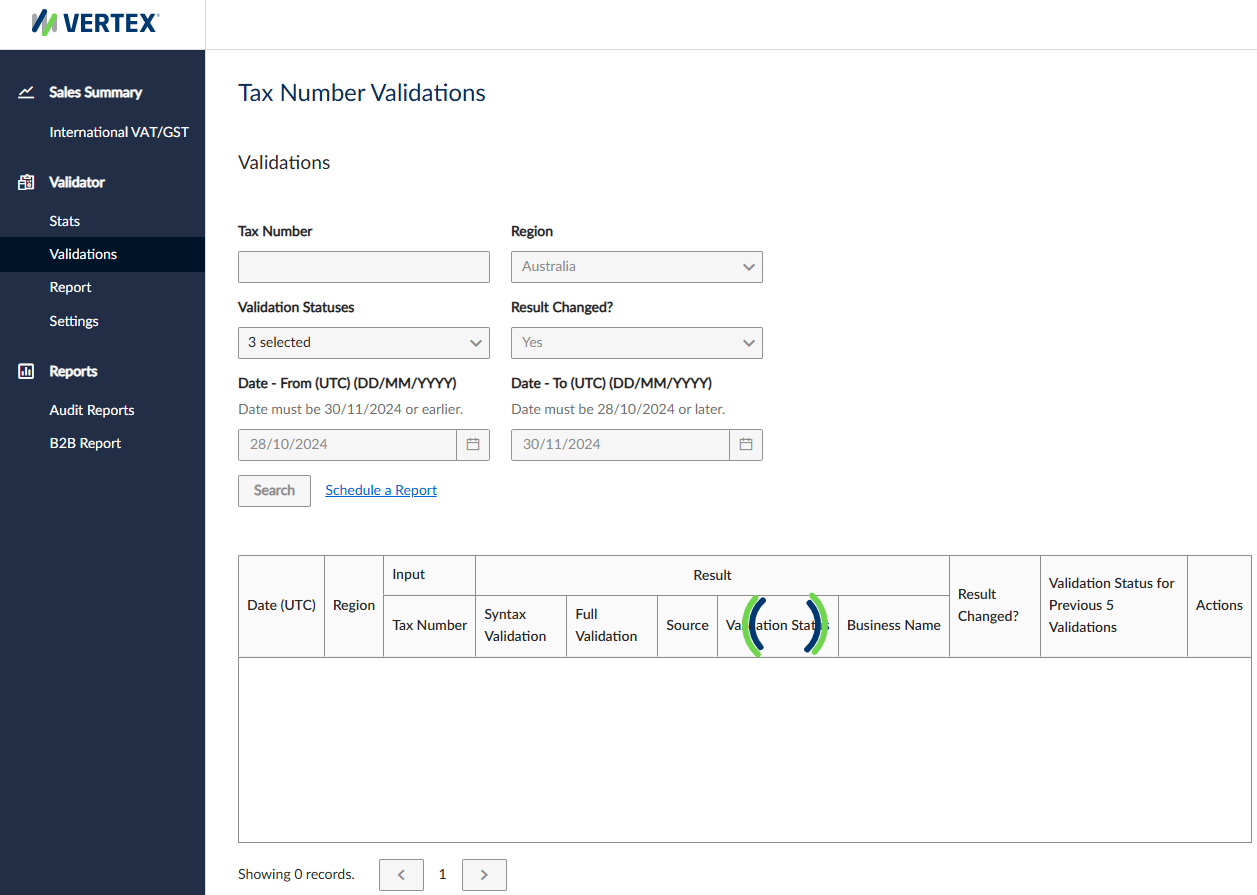
Tax Number Validations UI
To run a report, complete the filters. To run it immediately, click Search. To schedule a recurring report, click Schedule a Report.
Filters
The UI consists of the following filters:
| Filter | Description |
|---|---|
| Tax Number | The Tax ID. |
| Region | The county or region where Tax IDs are validated. |
| Validation Statuses | The status of the validation check. |
| Result Changed? | Indicates whether the report only includes Tax IDs whose statuses have changed. |
| Date - From | The date on which the report begins. |
| Date To | The date on which the report ends. |
Results
Results are displayed in a table with the following columns:
| Column | Description |
|---|---|
| Date (UTC) | The date in the system default time zone. |
| Region | The country or region where the Tax ID is from. |
| Input - Tax Number | The Tax ID that was specified in the inbound request. |
| Result - Syntax Validation | The result of the syntax check. |
| Result - Full Validation | The result of the validation check. |
| Result - Source | The source that was used in the full validation check. |
| Result - Validation Status | The status of the validation. |
| Result - Business Name | The name of the business to whom the Tax ID belongs. |
| Result Changed? | Indicates If the result has changed or not. |
| Validation Status for Previous 5 Validations | The statuses for the previous 5 validations. |
| Actions | Any actions. |
Updated 23 days ago
Did this page help you?