
Vertex O Series Cloud Integration
Vertex O Series Cloud customers can integrate Vertex Validator into their requests.
You can use this service to integrate the validation of Tax IDs such as VAT IDs with your existing Vertex O Series Cloud (O Series Cloud) deployment. You can validate the syntax and, where available, whether the Tax ID is active and considered valid by the validation provider, such as the VAT Information Exchange System (VIES).
This service uses an existing O Series Cloud request (the Calculate Tax as a Seller request from the O Series Cloud REST API), to integrate the service. You add the fields described here to this request.
You can access the dedicated UI for Vertex Validator by going to the O Series Cloud Dashboard and clicking the Vertex Validator tile. This gives you access to settings and reports.
Business benefits
This service helps you to do the following:
- Support for more than 50 countries and regions.
- Support for multiple validation types. For example, real-time and cache-based validations are supported.
- Dual number validation. For example, in Canada, it can validate both GST and HST.
- Some sellers are required to validate a business's tax number before applying a reverse charge and zero rating the transaction. Vertex’s B2B validation service supports this.
- Customers who may want to integrate supplier verification into their supplier onboarding process can also utilize this service.
Supported countries
The supported countries are listed in the Validation Type per Country topic.
Prerequisites
- You must have an existing O Series Cloud installation and use version 2 of the O Series Cloud API. The O Series Cloud API documentation is available on the Vertex Developer Network.
- You purchased Vertex Validator.
- You completed the onboarding process.
- Read the Calculate Tax as a Seller request topic from the Vertex O Series API documentation.
CautionThis service supports the
QUOTATIONandINVOICEMessage Types only. The others are not supported.
Authentication
There are 2 different authentication tokens:
- Validator Test: This token is used to access the Test system.
- Validator: This token is used to access the Production system.
To authenticate your requests, open the O Series Cloud Dashboard (click the Vertex O Series tile) and click the Security & Credentials tab. Select the Validator token. Use Validator for production and Validator Test for the sandbox:
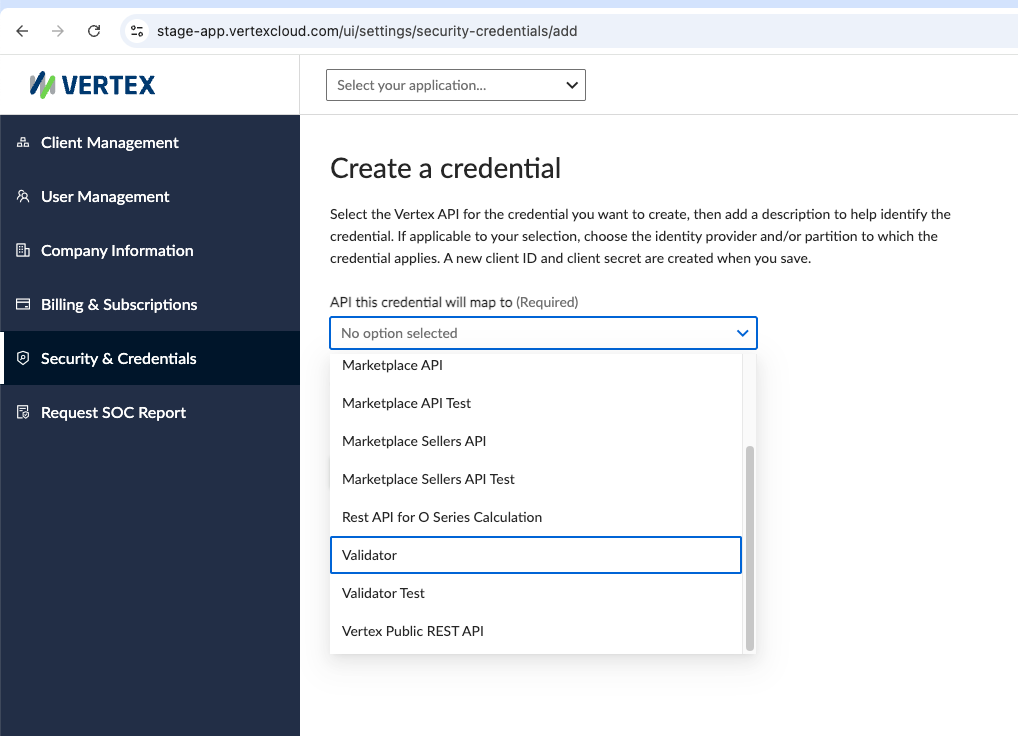
API Credentials
You need to use this token as part of your regular O Series Cloud authentication setup. More information is provided in the Authenticate O Series Cloud topic in the O Series Cloud API documentation.
API overview
There are 2 different API URIs for sandbox and production systems:
| Description | URL | Token |
|---|---|---|
| Sandbox | https://oseries-plus-api.sandbox.marketplace.taxamo.com/vertex-ws/v2/supplies | Validator Test |
| Production | https://oseries-plus-api.marketplace.taxamo.com/vertex-ws/v2/supplies | Validator |
You need to add the Tax ID and other information to the body of your Calculate Tax as a Seller request, using the API fields. Fields are listed in the Fields Reference topic.
Open API Specification (OAS) file
The OAS file can be downloaded from the O Series Cloud API Reference tab.
Requests
You must use the Calculate Tax as a Seller request:
| Request (Endpoint) | Description |
|---|---|
Calculate Tax as a Seller (v2/supplies) | This request represents tax calculation from the seller's perspective. |
CautionThis service supports the
QUOTATIONandINVOICEMessage Types only. The others are not supported.
The following fields are sent in the request:
| Field | Description |
|---|---|
customer.taxRegistrations.taxRegistrationNumber | This is the Tax ID that the Accelerator will validate. When this value is prefixed (with the country code) and the ID is valid, for example IE12345 and the value in the isoCountryCode field is not specified or is not a valid code, the prefix is used to specify the country that the Tax ID belongs to. |
customer.taxRegistrations.taxRegistrationAdditionalId | Use this field to provide an additional Tax ID when you want to validate IDs for countries like Egypt. See Egypt. |
customer.taxRegistrations.isoCountryCode | This is the ISO code that represents the country to which the registration belongs. This is sometimes added to the Tax ID (as a prefix) for countries that require this. |
customer.taxRegistrations.taxRegistrationType | This is the type of Tax Scheme to which the ID belongs, like VAT. If you specify no value here, the validation is run. If you do add a value, you must specify VAT Registration. This setting can also be configured by Vertex in the background settings during the implementation so it can vary. |
validationResult.isValid | You can use this Boolean to skip the validation process. See Turning Off Validation. |
Response
The following fields are returned in the response:
| Field | Description |
|---|---|
isValid | Boolean that indicates whether or not the Tax ID is valid. This is usually generated by the service, but it can also be set in the request. |
isSyntaxValid | Indicates whether the syntax is correct. |
validationInfo | More detailed information about the processing. |
taxRegistrationNumberNormalized | The Tax ID in the standardized format. |
cached | Indicates whether or not a cached validation was used. |
cacheTimestamp | If a cached value is returned, this field shows the time that the initial request was sent to the external service. |
name | The name that is associated with the Tax ID. Where available, this is retrieved from the Tax Authority's database. |
taxNumberService | The name of the service that was used to validate the ID. For example, vies means it was validated using VIES. |
freeformAddress | The address that is associated with the Tax ID. Where available, this is retrieved from the Tax Authority's database. |
customer.customercode.isBusinessIndicator | If the Tax ID is valid, this is set to true in the response, indicating that the customer is a business. |
Features
The following features are available:
Processing
When the request is sent, the service validates the Tax ID (specified in the customer.taxRegistrations.taxRegistrationNumber field). If the Tax ID is valid, it is passed to O Series Cloud. If it is not valid, the Tax ID is removed before the Calculate Tax as a Seller request is sent to O Series Cloud.
WarningThis service only validates Tax IDs that are specified in the API field. Tax IDs that are created on the O Series Cloud UI are not validated.
For example:
<----Code omitted for clarity----->
    "lineItems": [
        {
            "customer": {
                "customerName": "Swatch",
                "destination": {
                    "country": "CH"
                },
                "taxRegistrations": [
                    {
                        "taxRegistrationNumber": "CHCHE-116.294.121",
                        "taxRegistrationType": "VAT Registration"
                    },
                    {
                        "taxRegistrationNumber": "GB473116503"
                    }
                ]
            },
<----Code omitted for clarity----->
The API returns the following validation information. This snippet shows an example result for a valid Tax ID:
{
    "data": {
        "documentDate": "2025-07-23",
        "lineItems": [
            {
                "customer": {
                    "customerName": "MWST-Gruppe, The Swatch Group SA",
                    "destination": {
                        "country": "CH",
                        "taxAreaId": "807560000"
                    },
                    "taxRegistrations": [
                        {
                            "isoCountryCode": "CH",
                            "taxRegistrationNumber": "CHCHE-116.294.121",
                            "taxRegistrationType": "VAT Registration",
                            "validationResult": {
                                "cacheTimestamp": "2025-07-23T09:35:34.4650Z",
                                "cached": true,
                                "isSyntaxValid": true,
                                "isValid": true,
                                "name": "MWST-Gruppe, The Swatch Group SA",
                                "taxNumberService": "uid.admin.ch",
                                "taxRegistrationNumberNormalized": "CHE116.294.121",
                                "validationInfo": "tax-number-valid-according-to-external-service"
                            },
<----Code omitted for clarity----->
The following snippet shows how the response indicates that the customer is a business. The service adds this to the response after the Tax ID is validated:
<----Code omitted for clarity----->
                "customer": {
                    "customerCode": {
                        "isBusinessIndicator": true,
                          "value": "orlen"
<----Code omitted for clarity----->
Integration steps
To integrate the service, complete the following steps:
- Retrieve the API token. Log on to the O Series Cloud Dashboard and click the Vertex O Series (Cloud) tile. Choose the token.
- Review the prerequisites and your existing O Series Cloud API requests.
- Add the following information to the body of the request:
| Field | Description |
|---|---|
customer.taxRegistrations.taxRegistrationNumber | This is the Tax ID that the Accelerator will validate. When this value is prefixed (with the country code) and the ID is valid, for example IE12345 and the value in the isoCountryCode field is not specified or is not a valid code, the prefix is used to specify the country that the Tax ID belongs to. |
customer.taxRegistrations.taxRegistrationAdditionalId | Use this field to provide an additional Tax ID when you want to validate IDs for countries like Egypt. See Egypt. |
customer.taxRegistrations.isoCountryCode | This is the ISO code that represents the country to which the registration belongs. This is sometimes added to the Tax ID (as a prefix) for countries that require this. |
customer.taxRegistrations.taxRegistrationType | This is the type of Tax Scheme to which the ID belongs, like VAT. If you specify no value here, the validation is run. If you do add a value, you must specify VAT Registration. This setting can also be configured by Vertex in the background settings during the implementation so it can vary. |
validationResult.isValid | You can use this Boolean to skip the validation process. See Turning Off Validation. |
- Send the request.
- Check that the following fields are in the response:
| Field | Description |
|---|---|
isValid | Boolean that indicates whether or not the Tax ID is valid. This is usually generated by the service, but it can also be set in the request. |
isSyntaxValid | Indicates whether the syntax is correct. |
validationInfo | More detailed information about the processing. |
taxRegistrationNumberNormalized | The Tax ID in the standardized format. |
cached | Indicates whether or not a cached validation was used. |
cacheTimestamp | If a cached value is returned, this field shows the time that the initial request was sent to the external service. |
name | The name that is associated with the Tax ID. Where available, this is retrieved from the Tax Authority's database. |
taxNumberService | The name of the service that was used to validate the ID. For example, vies means it was validated using VIES. |
freeformAddress | The address that is associated with the Tax ID. Where available, this is retrieved from the Tax Authority's database. |
customer.customercode.isBusinessIndicator | If the Tax ID is valid, this is set to true in the response, indicating that the customer is a business. |
Examples
Examples are provided in the Examples topic.
User interfaces (UIs)
To access the UI, go to Vertex portal here and click the Vertex Validator tile.
The Vertex Validator UIs are described in the Vertex Validator UIs section that includes the following UIs and topics:
Reports
You can use the Tax Number Validation report to retrieve validation information. To access this report, go to the UI and click Reports. More information is provided in the Tax Number Validation Report topic.
Useful links
| Link | Description |
|---|---|
| Sandbox | https://oseries-plus-api.sandbox.marketplace.taxamo.com/vertex-ws/v2/supplies |
| Production | https://oseries-plus-api.marketplace.taxamo.com/vertex-ws/v2/supplies |
| Dashboard (UI) | https://app.vertexcloud.com/ |
In this section
| Topic | Description |
|---|---|
| Vertex O Series Cloud Integration | Read about how existing Vertex O Series Cloud customers can integrate Vertex Validator. |
| Turning Off Validation | You may want to tun off validation for specific use cases. |
| Multiple Tax IDs and Registration Types | In some cases, you may need to send multiple Tax IDs in a single request. |
| Syntax-Only Check | You can set the service so that only the syntax of the Tax ID is checked. |
| Egypt | Read about how to configure the API to validate Egyptian Tax IDs. |
| Switzerland | Read about how to validate Swiss Tax IDs. |
| Fields Reference | This topic lists the fields that you can use with the API request. |
| Examples | Get an overview of some example requests and responses. |
Updated 3 months ago