
Detailed Settlement Report
Generate detailed settlement transaction reports.
The Detailed Settlement Report feature lets you generate a detailed view of settlement transactions for reporting and reconciliation purposes.
Schedule a report
To schedule a report, follow these steps:
- Select Reports > Detailed Settlement Report.
- Enter any applicable information in the fields, including all required fields.
- Click Schedule Report to view the results.
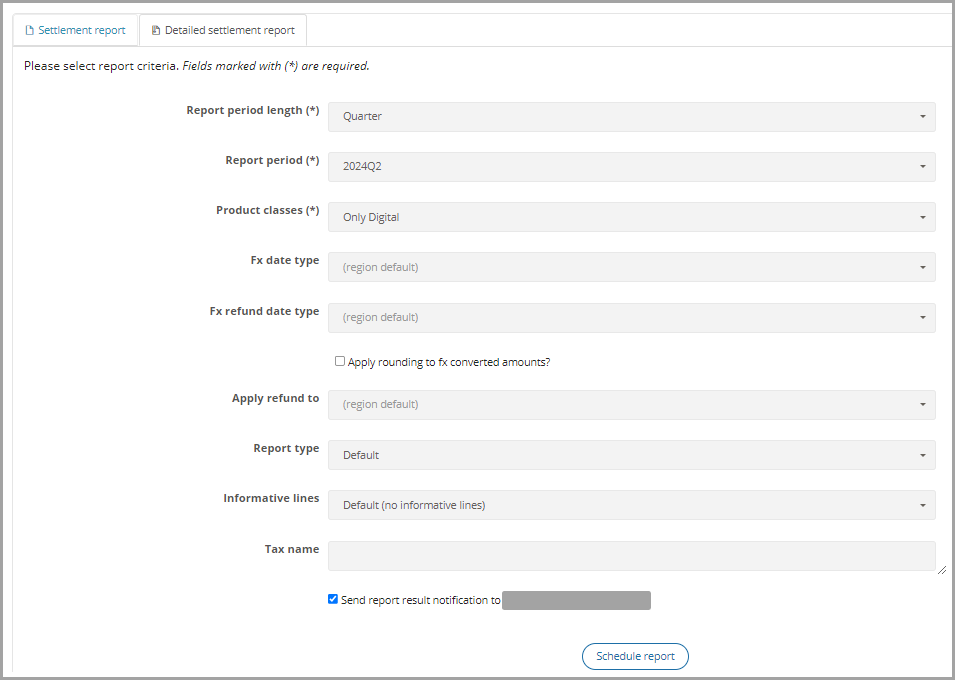
The Detailed Settlement Report feature.
Filters
This table lists the available filters and their descriptions.
| Field | Description |
|---|---|
| Report period length | The length of the reporting period. |
| Report period | The specific reporting period. |
| Product classes | The product class for physical or digital goods. |
| FX date type | The specific date type. For example, Order date, Day before order date, or Last from the selected range. |
| FX refund date type | The specific date type for refunds. For example, Order date, Day before order date, or Last from the selected range. |
| Apply rounding to FX converted amounts | Rounds the converted currency values to two decimal places when enabled. |
| Apply the refund to | Applies refunds based on the order date or the refund date. |
| Report type | Always set to Default. |
| Informative lines | Includes or excludes informative transactions. Default excludes informative transactions. |
| Tax name | The desired tax name. |
| Send the report result notification to | Sends the report to the user's email address. |
This table lists the country or region-specific filters and their descriptions for the United States.
| Field | Description |
|---|---|
| States | Filters the results by state in the United States (US). |
Results
This table lists the available results and their descriptions.
| Field | API Details | Description |
|---|---|---|
| Transaction type | The service generates this value and returns it in the response. | Identifies whether the transaction is a sale or a refund. |
| Exchange rate | Field:additional_currencies.invoice.fx_rateData Type: Float Report Date Type: String | The exchange rate used in the transaction, if applicable. |
| Exchange rate date | Field:additional_currencies.invoice.fx_dateData Type: String Report Data Type: String | The date on which the exchange rate was retrieved, if applicable. |
| FX source | Field:fx_sourceData Type: String Report Data Type: String | The source of the exchange rate. |
| Currency code | Field:transaction.currency_codeData Type: String Report Data Type: String | The transaction currency code. |
| Target currency code | Field:additional_currencies.invoice.currency_codeData Type: String Report Data Type: String | The reporting currency code. |
| Key | Field:transaction.keyData Type: String Report Data Type: String | The unique transaction identifier generated by the service. |
| Country code | Field:transaction.tax_country_codeData Type: String Report Data Type: String | The tax jurisdiction country code. |
| Tax country name | Field:transaction.country_nameData Type: String Report Date Type: String | The tax jurisdiction country name. |
| Tax deducted | Field:transaction.tax_deductedData Type: Boolean Report Data Type: Boolean | Indicates whether tax was deducted. |
| Amount | Field: transaction.amountData Type: Float Report Data Type: String | The tax-exclusive amount. |
| FX converted amount | The service calculates this value when the report is run and returns it in the response. | The tax-exclusive amount in the reporting currency. |
| Tax amount | Field:transaction.transaction_lines.tax_amountData Type: Float Report Data Type: String | The tax amount in the transaction line. |
| FX converted tax amount | The service calculates this value when the report is run and returns it in the response. | The tax amount in the transaction line in the reporting currency. |
| Tax rate | Field:transaction.transaction_lines.tax_rateData Type: Float Report Data Type: String | The tax rate in the transaction. |
| Total amount | Field:transaction.total_amountData Type: Float Report Data Type: String | The sum of the Amount and Tax amount values in the transaction. |
| FX converted the total amount | Field:additional_currencies.invoice.tax_amountData Type: Float Report Data Type: String | The sum of the Amount and Tax amount values in the reporting currency. |
| Product type | Field:`transaction.transaction_line.product_type` Data Type: String Report Data Type: String | The product type (for example, physical or digital goods). |
| Custom id | Field:transaction.transaction_line.custom_idData Type: String Report Data Type: String | The unique identifier in the transaction line, if applicable. |
| Order date | Field:transaction.order_dateData Type: String Report Data Type: String | The order date for the transaction. |
| Refund date | Field:refunds.refund_timestampData Type: String Report Data Type: String | The refund date for the transaction. |
| Invoice number | Field:transaction.invoice_numberData Type: String Report Data Type: String | The invoice number for the transaction. |
| Postal code | Field:transaction.invoice_address.postal_codeData Type: String Report Data Type: String | The customer's postal code. |
| Region | Field:transaction.invoice_address.regionData Type: String Report Data Type: String | The customer's country or region. |
| Sub account id | Field:transaction.merchant_idData Type: Integer Report Data Type: Integer | The unique identifier for your business, if applicable. |
| External unique id | Field:transaction.external_unique_idData Type: String Report Data Type: String | The external unique identifier for your business. |
| Product class | Field:transaction.transaction_line.product_classesData Type: String Report Data Type: String | The product type (for example, physical or digital goods). |
| Line invoice number | Field:transaction.transaction_line.transaction_idData Type: Integer Report Data Type: Integer | The invoice line item represents a product when multiple products in a transaction have different tax rates or tax treatments, which can result in multiple invoices from Vertex. |
| Line tax country name | The service generates this field when two countries are liable for tax in a transaction. In this case, it contains information about the second country. | The tax country name for a line item when multiple products in a transaction have different tax rates or tax treatments. |
This table lists the country or region-specific results and their descriptions for the United States.
| Field | API Details | Description |
|---|---|---|
| Tax component tax name | Field:transaction.transaction_line.tax_nameData Type: String Report Data Type: String | The sales tax type. For example, STATE SALES TAX, COUNTY SALES TAX, DISTRICT TAX, CITY SALES TAX, SPECIAL LOCAL - CAPITAL PROJECTS, or SPECIAL LOCAL - EDUCATION CAPITAL IMPROVEMENT. |
| Tax component tax amount | Field:transaction.transaction_line.tax_amountData Type: String Report Data Type: String | The sales tax amount in the transaction. |
| Tax component tax rate | Field:transaction.transaction_line.tax_rateData Type: String Report Data Type: String | The sales tax rate in the transaction. |
| Tax component jurisdiction code | The service generates this value and returns it in the response. | The tax jurisdiction code. |
| Tax component tax authority ID | The service generates this value and returns it in the response. | The tax authority identification. |
| Tax component tax authority name | The service generates this value and returns it in the response. | The tax authority name. |
| Product code | Field:transaction.transaction_line.product_codeData Type: String Report Data Type: String | The reference code used to identify products for US-based transactions. |
API integration
You can also use the following API integrations:
- Use the Schedule Detailed Settlement Reports request to run a report automatically on a schedule.
- Use the List Detailed Settlement Reports request to retrieve a report for a specified period.
- Use the List Scheduled Detailed Settlement Reports request to retrieve an automatically scheduled report.
- Use the Download Detailed Settlement Reports request to download a report.
Automated scheduling
You can configure automated scheduling to generate a Detailed Settlement Report on a recurring schedule. For more information, see Schedule Detailed Settlement Reports.
When a scheduled report completes, the service sends a report.complete webhook event. You can use this webhook to receive a completion notification and download the report. For more information, see Vertex Webhooks.
Updated about 1 month ago