
Invoice Settings
Manage how the service generates and delivers tax-compliant digital invoices.
The Invoice Settings feature lets you configure how the service generates, delivers, and manages tax-compliant digital invoices across supported countries and regions.
Configure the settings
To configure the settings, follow these steps:
- Select Invoice IQ > Invoice Settings.
- Enter all applicable information, noting all required fields.
- Click Save.
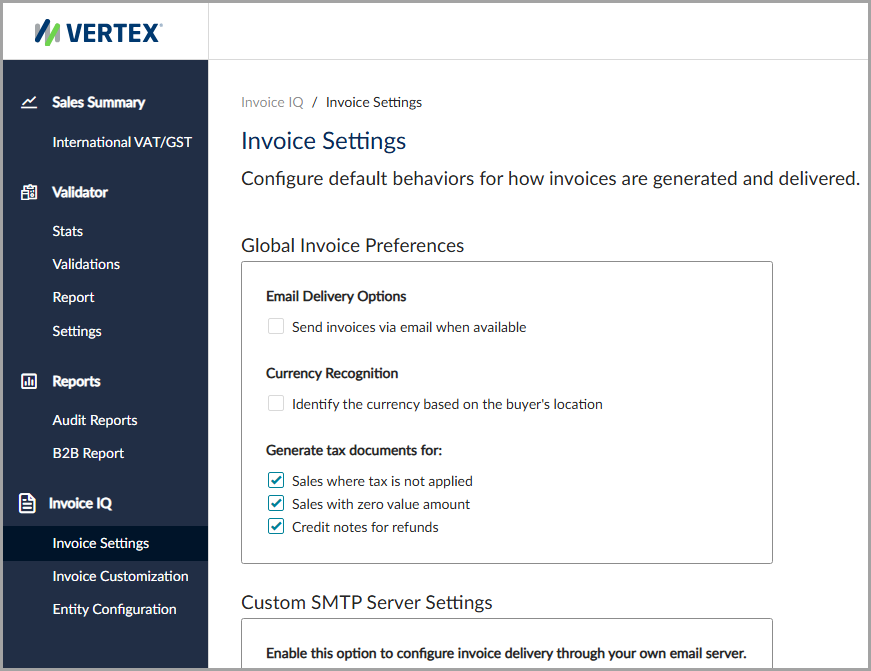
The Invoice Settings feature.
Global invoice preferences
You can configure these settings for the Integrated Vertex Invoice IQ and Standalone Vertex Invoice IQ.
This table lists the available fields and their descriptions.
| Field | Description |
|---|---|
| Send invoices via email when available | Indicates whether to send an email notification for generated invoices. |
| Identify the currency based on the buyer's location | Use the buyer's location to identify the currency. |
| Sales where tax is not applied | Generate invoices for transactions where tax isn't applied. |
| Sales with zero value amount | Generate invoices for transactions with an amount of zero. |
| Credit notes for refunds | Generate credit notes for refunds. |
Custom SMTP server settings
This table lists the available fields and their descriptions.
| Field | Description |
|---|---|
| Enable custom SMTP configuration | Indicate whether to use a custom SMTP server for email notifications. |
| User Name | The user to access the SMTP server. |
| Password | The user's password. |
| Hostname | The hostname to access the SMTP server. |
| Port number | The server's port number. |
| From | The email address to include in the email's From field. |
| What should happen if custom email sending fails? | Indicates the behavior when the service doesn't send a custom email notification. The available options are Retry using the custom SMTP server or Use the default SMP server instead. |
| Test Email | Enter an email address to send a test message from the custom SMTP server. |
Regional configuration settings
Under Regional Configuration, you can select the countries and regions where you want to apply your invoice settings. You can apply your settings to all countries and regions or to assigned countries and regions.
Updated 4 months ago