
Report Storage
Store reports using the service's storage or connect your preferred cloud storage location.
Use the Report File Upload feature to configure where the service stores generated report files. The sevice can store report files in the Vertex-hosted cloud storage or in your preferred cloud storage location.
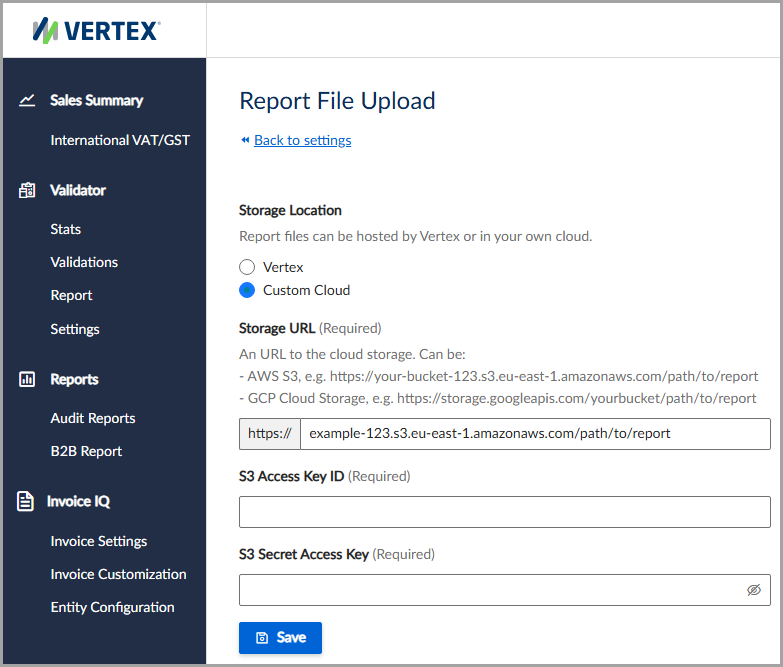
You can use a custom cloud storage location, such as Amazon Web Services.
Supported cloud storage
Here's a list of supported cloud storage:
Configure cloud storage
To use custom cloud storage, follow these steps:
- Select Settings > File Upload.
- Under Storage Location, select Vertex or Custom Cloud.
- Enter all applicable information, noting all required fields.
- Click Save.
Field descriptions
| Field | Description |
|---|---|
| Storage Location | Select where the report files are stored. Vertex stores report files using the Vertex-hosted cloud storage. Custom Cloud uses your preferred cloud storage location. |
| Storage URL | The HTTP URL to the custom cloud storage location where the report files are stored. |
| S3 Access Key ID | For Amazon Web Services, the access key identifier used to authenticate access to the S3 bucket. |
| S3 Secret Access Key | For Amazon Web Services, the secret access key associated with the access key identifier. |
Updated 4 months ago
Did this page help you?