
Validator Reports
Generate detailed validation reports. Export data for audits, compliance, and additional analysis.
The Tax Number Validator Report feature lets you generate a one-time tax number validation report or schedule a report to run automatically at specified times and frequencies.
Before you can schedule a recurring report, you must create a filter for the report.
Schedule the report
To schedule the report, follow these steps:
- Select Validator > Report.
- Select New report.
- Enter all applicable information, noting all required fields, then click Next.
- Enter the report schedule, and then click Schedule report.
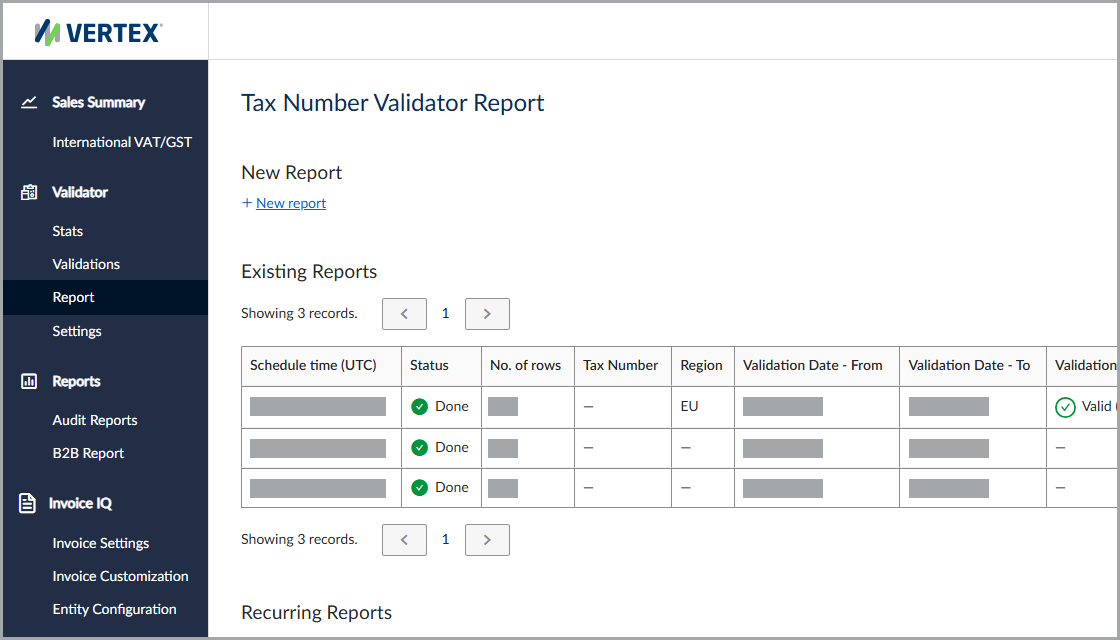
The Tax Number Validator Report feature
Filters
This table lists the available filters and their descriptions.
| Field | Description |
|---|---|
| Tax Number | The desired tax number. |
| Region | The country or region where the service validated the tax number. |
| Validation Statuses | The validation status. |
| Results Changed | Indicates whether the report includes only validation results with changed statuses. |
| Report Schedule | Indicates whether the report is a one-time report or a recurring report generated periodically. |
| Date - From (UTC) | The report start date. |
| Date - To (UTC) | The report end date. |
| Recurring Report Name | The name associated with the recurring report. |
| Report Period Length | Specifies how often the service generates the recurring report. |
Results
The service includes existing and recurring reports, as well as report storage settings.
Existing report fields
This table lists the available fields in the Existing Reports section.
| Field | Description |
|---|---|
| Schedule time (UTC) | The date and time when the report is scheduled to run in the service's default time zone. |
| Status | The report status. |
| No. of rows | The number of rows in the row. |
| Tax Number | The tax number. |
| Region | The country or region to which the tax number belongs. |
| Validation Date - From | The start date of the validation period. |
| Validation Date - To | The end date of the validation period. |
| Validation Result | The validation result. |
| Result Changed | Indicates whether the validation result has changed. |
| Download | A link to download the report. |
Recurring report fields
This table lists the available fields in the Recurring Reports section.
| Field | Description |
|---|---|
| Name | The name associated with the recurring report. |
| Status | The report status. |
| Next Report Date (UTC) | The next scheduled run time in the service's default time zone. |
| Next Report Period | The frequency used for the next report. |
| Tax Number | The tax number. |
| Region | The country or region to which the tax number belongs. |
| Validation Result | The validation result. |
| Result Changed | Indicates whether the validation result has changed. |
| Actions | Available actions for the report. |
Report storage
You can store a report using the service's storage or connect your preferred cloud storage location.
For more information, see Report File Upload.
Webhook and email notifications
The service can send a webhook and email notification when a report completes successfully.
For more information, see Webhook and Email Notifications.
Updated 4 months ago