
Users
Add, view, and manage user profiles for the service.
The Users feature enables administrators to add, view, and manage user profiles. It centralizes user access management and role administration for the service.
Use the Add User section to invite a new user by entering an email address and assigning a user role. Existing users appear in the Exisiting Users section, which displays each user's email address, multi-factor authenticiation status, assigned role, and available actions.
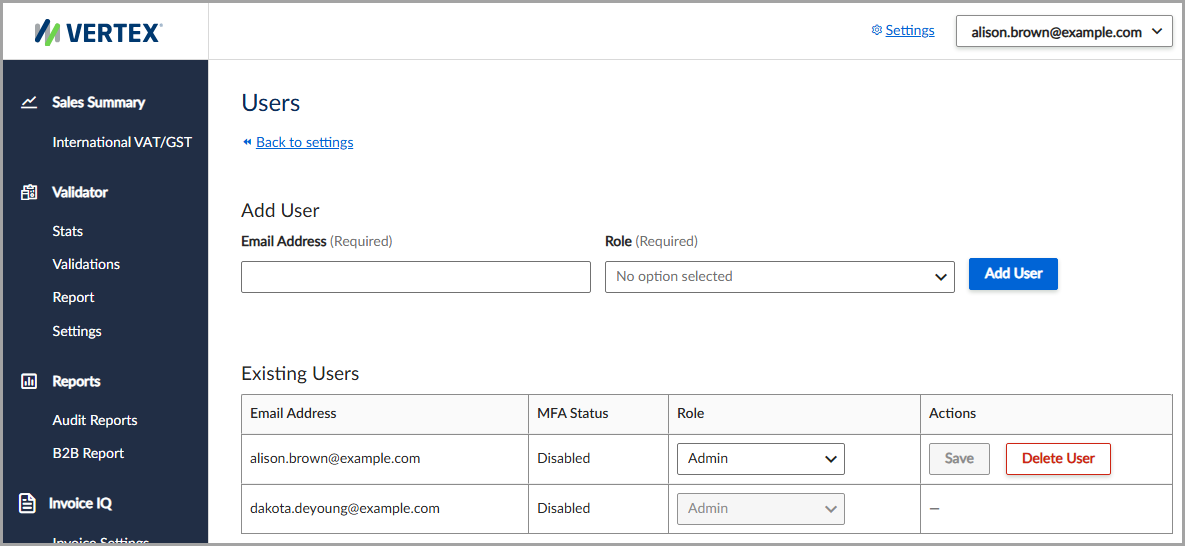
View a list of existing users, or add a new user.
Add a user
To add a new user, follow these steps:
- Select Settings > Users.
- Enter the user's Email Address.
- Select the user's Role from the dropdown list.
- Click Add User.
Field descriptions
The following table describes the available fields:
| Field | Description |
|---|---|
| Email Address | The user's email address. |
| Role | The role assigned to the user. |
Updated 4 months ago
Did this page help you?