
Navigate the User Interface
You can use the service's User Interface, called the Dashboard, to operate and configure the service.
The Vertex O Series Cloud user interface includes three main panes that help you manage context, navigate features, and configure your setup:
- The contextual bar at the top of the window lets you switch products, partitions, business events, and effective dates. You also use it to log out.
- The navigation menu provides access to features organized by functional areas.
- The feature pane displays the currently selected feature and serves as the workspace for configuration, management, and reporting activities.
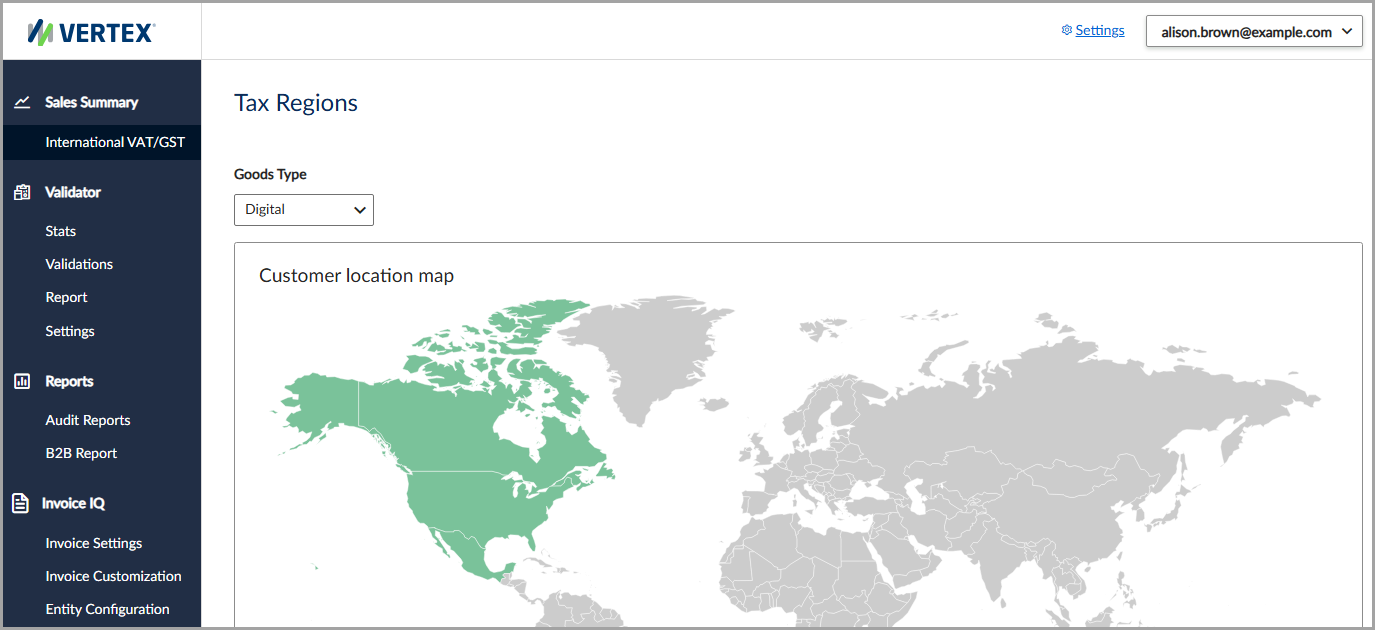
The user interface includes the contextual bar, navigation menu, and feature pane.
Navigate the user interface
Here's a list of user interfaces supported in the service:
| User interface | Description |
|---|---|
| Sales Summary | View the global customer sales distribution for each country and region. |
| Validator | Everything you need to configure and manage tax number validations. |
| Reports | Everything you need to configure and manage reporting and notification capabilities. |
| Invoice IQ | Everything you need to configure and manage tax-compliant digital invoices. |
| Settings | Everything you need to configure and manage account and system settings. |
Updated 4 months ago
Did this page help you?