
Webhook and Email Notifications
Send a notification when a report completes successfully or encounters a problem.
Use the Notifications feature to configure webhook and email notifications for service events, such as when a report completes successfully or encounters a problem. You can choose from the following notifications:
- Email—Send an email to your email address when a report event occurs.
- Webhook (HTTP endpoint)—Trigger a webhook to send a report status update for downstream automation.
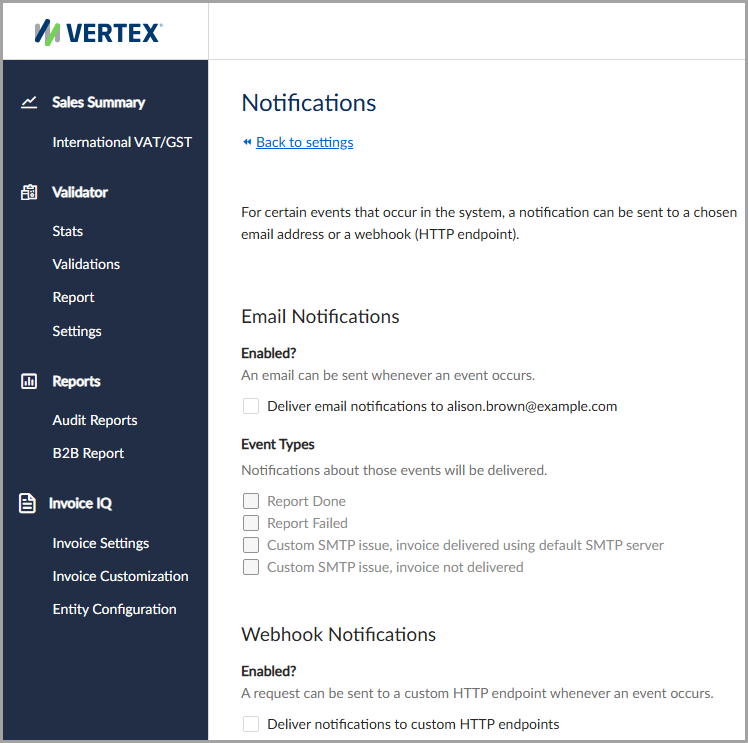
Enable email and webhook notifications from your settings.
Email notifications
Use email notifications to send event data to your email address when selected events occur.
To enable email notifications, select the Deliver email notifications to checkbox. Once enabled, the service sends notifications to the displayed email address.
Webhook notifications
Use webhook notifications to send event data to a custom HTTP endpoint when selected events occur.
To enable webhook notifications, select the Deliver notifications to custom HTTP endpoints checkbox, then enter a valid endpoint in the HTTP Endpoint URL field.
Event types
You can send notifications for the following event types:
| Event type | Description |
|---|---|
| Report Done | Send a notification when a report completes successfully. |
| Report Failed | Send a notification when a report fails. |
| Custom SMTP issue, delivered using default SMTP server | Send a notification when a custom SMTP server issue occurs and the report is delivered using the default SMTP server. |
| Custom SMTP issue, invoice not delivered | Send a notification when a custom SMTP server issue prevents invoice delivery. |
Updated 4 months ago