
Email and Webhook Notifications
Send a notification when a report completes successfully or encounters an error.
Use the Notifications feature to configure email and webhook notifications for service events, such as when a report completes successfully or encounters an error. Choose from the following notification types:
- Email—Send an email to your email address when a report event occurs.
- Webhook (HTTP endpoint)—Send a report status update to a webhook for downstream automation.
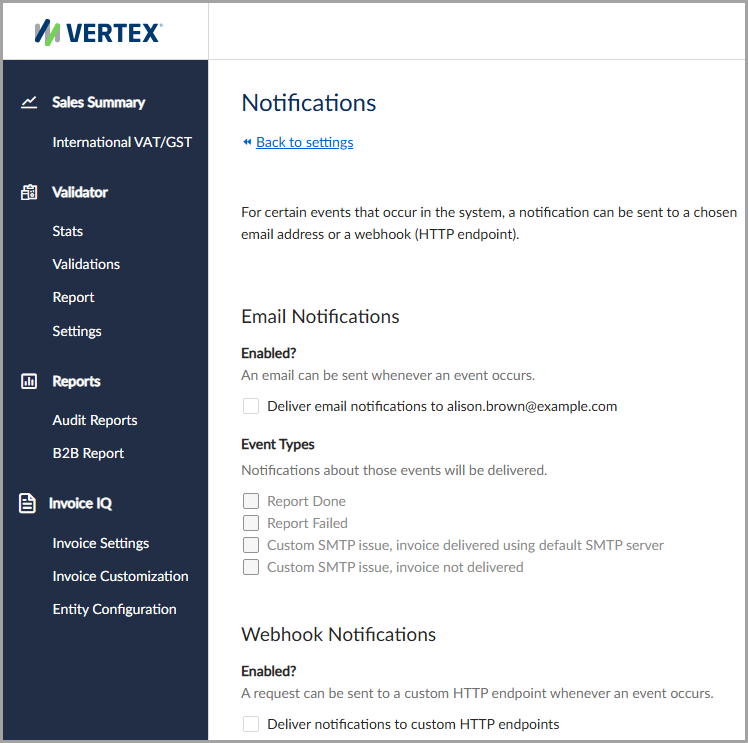
Enable email and webhook notifications from your settings.
Email notifications
Use email notifications to send event data to your email address when selected events occur.
NoteThe service supports only one email address to receive email notifications.
To enable email notifications, select the Deliver email notifications to checkbox. After you enable the setting, the service sends notifications to the email address displayed.
Webhook notifications
Use webhook notifications to send event data to a custom HTTP endpoint when selected events occur.
To enable webhook notifications, select the Deliver notifications to custom HTTP endpoints checkbox, and then enter a valid endpoint URL in the HTTP Endpoint URL field.
Event types
The following notification event types are available:
| Field | Description |
|---|---|
| Report Done | Sends a notification when a report completes successfully. |
| Report Failed | Sends a notification when a report fails. |
| Custom SMTP issue, delivered using the default SMTP server | Sends a notification when an issue with a custom SMTP server occurs and the report is delivered using the default SMTP server. |
Updated 3 months ago