
Report Storage
Store reports in the service's storage or connect to your preferred cloud storage location.
Use the Report File Upload feature to configure where the service stores generated report files. The service can store report files in the Vertex-hosted cloud storage or in your preferred cloud storage location.
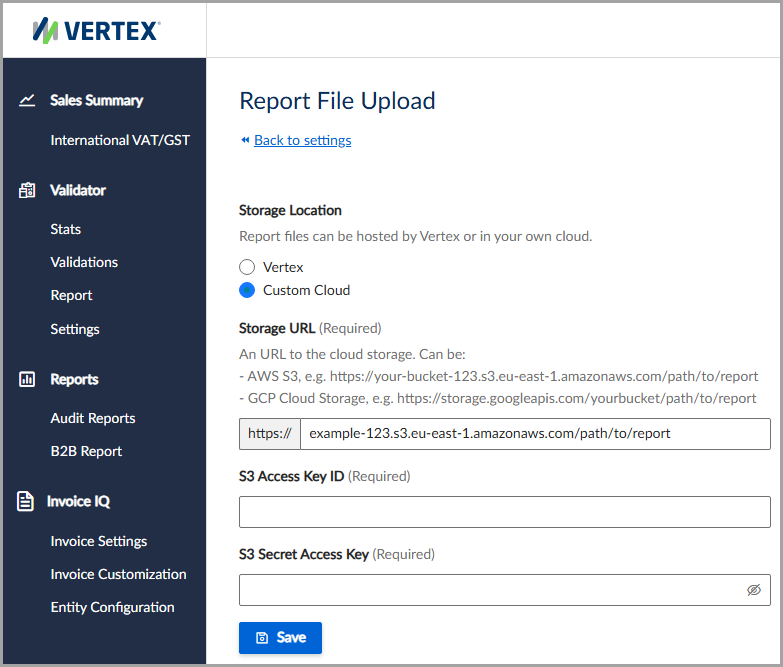
You can use a custom cloud storage location, such as Amazon Web Services.
Supported cloud storage
The following cloud storage locations are available:
Configure cloud storage
To use a custom cloud storage location, follow these steps:
- Select Settings > File Upload.
- Under Storage Location, select Vertex or Custom Cloud.
- Enter all applicable information, noting all required fields.
- Click Save.
Field descriptions
| Field | Description |
|---|---|
| Storage Location | Select where to store report files. Vertex stores report files in Vertex-hosted cloud storage. Custom Cloud stores report files in your preferred cloud storage location. |
| Storage URL | The HTTP URL for the custom cloud storage location where report files are stored. |
| S3 Access Key ID | For Amazon Web Services, the access key identifier used to authenticate access to the S3 bucket. |
| S3 Secret Access Key | For Amazon Web Services, the secret access key associated with the access key identifier. |
Updated 3 months ago
Did this page help you?