
Validator Report
Generate validation reports. Export data for audits, compliance, and analysis.
The Tax Number Validator Report feature lets you generate a one-time tax number validation report or schedule recurring reports to run automatically at specified times and frequencies.
Before you schedule a recurring report, you must create a filter for the report.
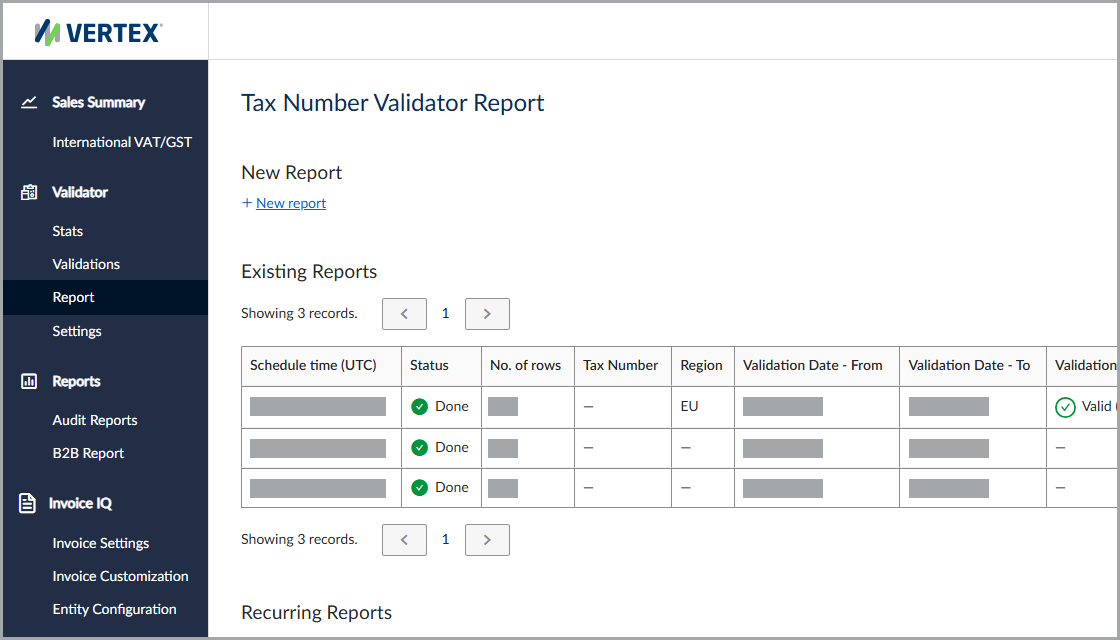
Generate a one-time tax number validation report or schedule recurring reports in the service.
Schedule the report
To schedule the report, follow these steps:
- Select Validator > Report.
- Select New report.
- Enter all applicable information, noting all required fields, and then click Next.
- Enter the report schedule, and then click Schedule report.
Filters
This table lists the available filters and their descriptions.
| Field | Description |
|---|---|
| Tax Number | The desired tax number. |
| Region | The country or region where the service validated the tax number. |
| Validation Statuses | The validation status. |
| Results Changed | Indicates whether the report includes only validation results with changed statuses. |
| Report Schedule | Indicates whether the report is a one-time report or a recurring report generated periodically. |
| Date - From (UTC) | The report start date. |
| Date - To (UTC) | The report end date. |
| Recurring Report Name | The name associated with the recurring report. |
| Report Period Length | Specifies how often the service generates the recurring report. |
Results
The service includes existing and recurring reports, as well as report storage settings.
Existing report fields
This table lists the available fields in the Existing Reports section.
| Field | Description |
|---|---|
| Schedule time (UTC) | The date and time when the report is scheduled to run in the service's default time zone. |
| Status | The report status. |
| No. of rows | The number of rows in the row. |
| Tax Number | The tax number. |
| Region | The country or region to which the tax number belongs. |
| Validation Date - From | The start date of the validation period. |
| Validation Date - To | The end date of the validation period. |
| Validation Result | The validation result. |
| Result Changed | Indicates whether the validation result changed. |
| Download | A link to download the report. |
Recurring report fields
This table lists the available fields in the Recurring Reports section.
| Field | Description |
|---|---|
| Name | The name associated with the recurring report. |
| Status | The report status. |
| Next Report Date (UTC) | The next scheduled run time in the service's default time zone. |
| Next Report Period | The frequency used for the next report. |
| Tax Number | The tax number. |
| Region | The country or region to which the tax number belongs. |
| Validation Result | The validation result. |
| Result Changed | Indicates whether the validation result changed. |
| Actions | Available actions for the report. |
Report storage
You can store reports in the service's storage or connect to your preferred cloud storage location.
For more information, see Report Storage.
Email and webhook notifications
The service can send an email or webhook notification when a report completes successfully.
For more information, see Email and Webhook Notifications.
Updated 3 months ago