
Access the User Interface
Log in to the Vertex O Series Cloud portal using your secure authentication.
How you log in to the user interface depends on the service and its version.
Vertex requires a unique identifier to log in to the user interface. Your email address is the unique identifier. If you have multiple accounts, your email address is associated with all of your accounts.
How to log in
Vertex O Series Online Commerce, Integrated Vertex Invoice IQ, and Integrated Vertex Validator provide the user interface via the Vertex O Series Cloud portal.
| Environment | URL |
|---|---|
| Vertex O Series Cloud Portal | https://app.vertexcloud.com |
Vertex for e-Commerce, Vertex for Marketplaces, Standalone Vertex Invoice IQ, and Standalone Vertex Validator provide the user interface via the dedicated Vertex dashboard.
| Environment | URL |
|---|---|
| Sandbox | https://manage.sandbox.marketplace.taxamo.com |
| Production | https://manage.marketplace.taxamo.com |
User profile authentication
Vertex uses an identity provider to authenticate user profiles. The provider authenticates user profiles through a multi-factor authentication process across our systems, helping to ensure a more secure environment. Availability and access to all functionality remain uninterrupted.
Criteria for passwords
Passwords must be between 8 and 128 characters in length and must contain at least one uppercase letter, one lowercase letter, one number, and one special character (such as !@#$%^&*<>?).
Log in to your account
To log in to the user interface, follow these steps:
- Do one of the following:
- Click the Vertex O Series Cloud portal link: https://app.vertexcloud.com
- Click the Vertex dashboard link: https://manage.marketplace.taxamo.com
- Enter your Email address and click Continue.
- Enter your Password and click Continue.
- The Vertex landing page displays tiles (Vertex O Series Cloud portal) or sections (Vertex dashboard) for each of your licensed products.
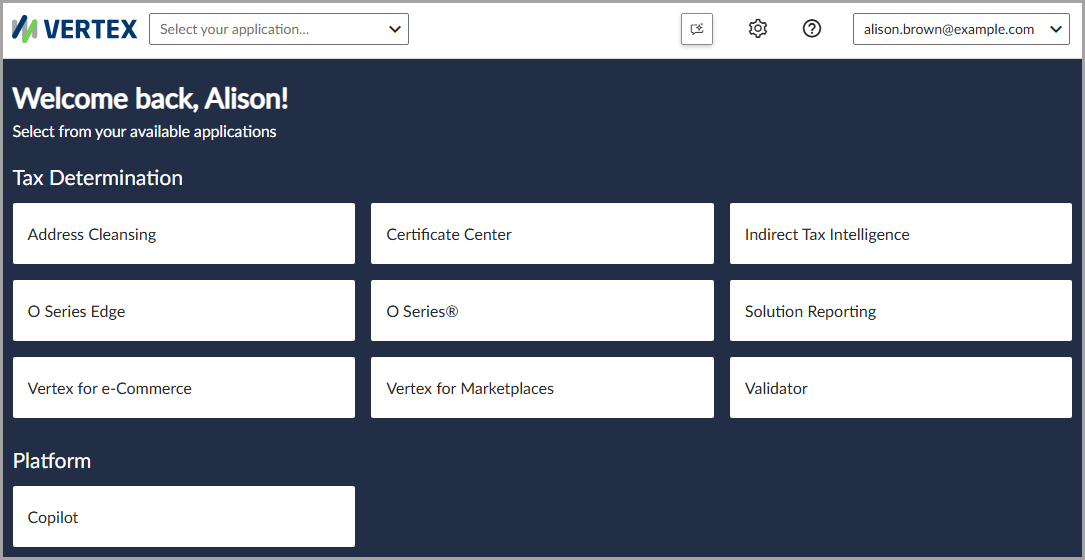
In the Vertex O Series Cloud portal, the landing page displays tiles for each of your licensed products.
Updated 3 months ago