
Validator Settings
Manage the tax number validation settings in the service.
The Tax Number Validation Settings feature enables you to configure tax number validation settings for countries and regions across the different validation endpoints.
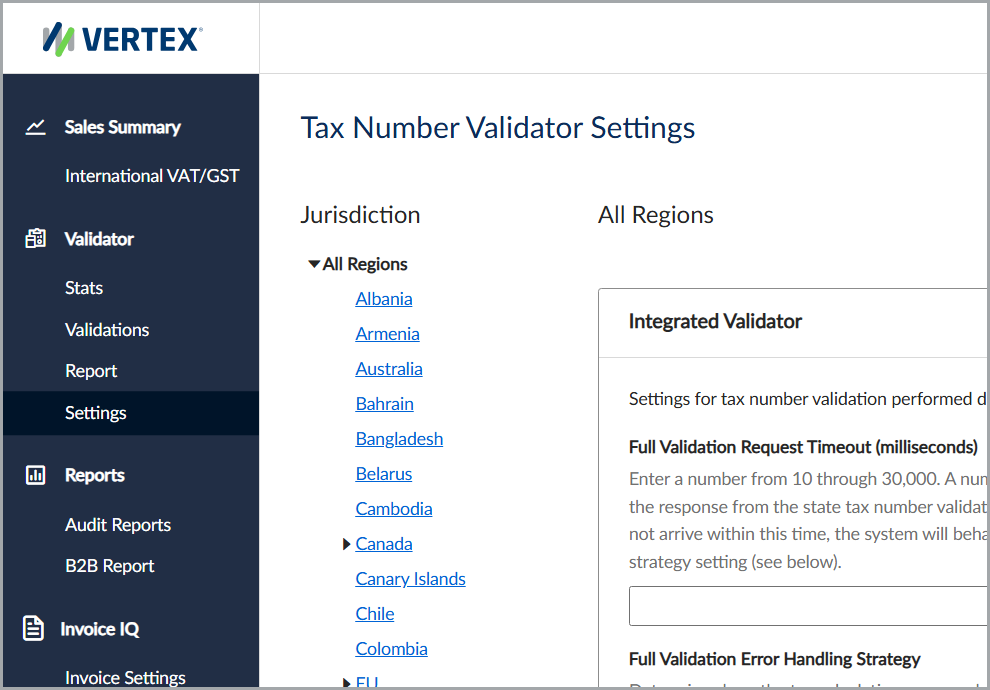
Configure the tax number validation settings for each country and region.
Configure the settings
To configure the settings, follow these steps:
- Select Validator > Settings.
- Under Jurisdiction, click All Regions to configure the default settings, or select a specific country or region.
- Enter all applicable information, noting all required fields.
- Click Save.
Jurisdictions
Configure the default settings for all countries and regions, and then configure individual countries or regions as needed.
On the All Regions page, you can configure the default settings for all tax number validations. You can override these settings for individual countries or regions. Country- or region-level settings take precedence over the default settings.
For example, a timeout configured on the Australia page overrides the timeout configured on the All Regions page.
Settings
You can configure these settings for the Integrated Vertex Validator or Standalone Vertex Validator. If you do not configure a setting, the service applies its default value.
The following table lists the available settings and describes each one.
| Field | Description | Default |
|---|---|---|
| Validation Strategy | Determines the validation type. | Full Validation |
| Full Validation Request Timeout (milliseconds) | Specifies how long the service waits for a response from the external tax authority system before timing out. | 20 seconds |
| Full Validation Error Handling Strategy | Specifies how the service handles errors when full validation can't run (for example, when the external tax authority system is unavailable). Integrated Vertex Validator can proceed with a syntax check, mark the tax number as invalid, or block tax calculation. Standalone Vertex Validator can either perform a syntax check or mark the tax number as invalid. | Proceed |
| Full Validation Cache Expiry (days) | The service can cache validation results. Control how long the service stores and reuses validation results. Set to 30 to cache results for 30 days. Set to 0 to disable caching and validate each request using real-time validation. | 30 days |
Considerations
Note the following considerations:
- Full validation in Bahrain, India, Oman, and the United Arab Emirates can take tens of seconds. The default timeout in these countries is 60 seconds, and for the Integrated Vertex Validator, the default strategy is syntax validation.
- Full validation in Italy (by the Italian Revenue Agency) can also take tens of seconds. VAT Information Exchange System (VIES) validation is typically faster.
Updated 3 months ago